Expense Tracker
A straightforward way to record every rupee in and out — organised by category, with date-ordered reports, Excel export, and reliable backups. Available as a Windows desktop app and a web app.
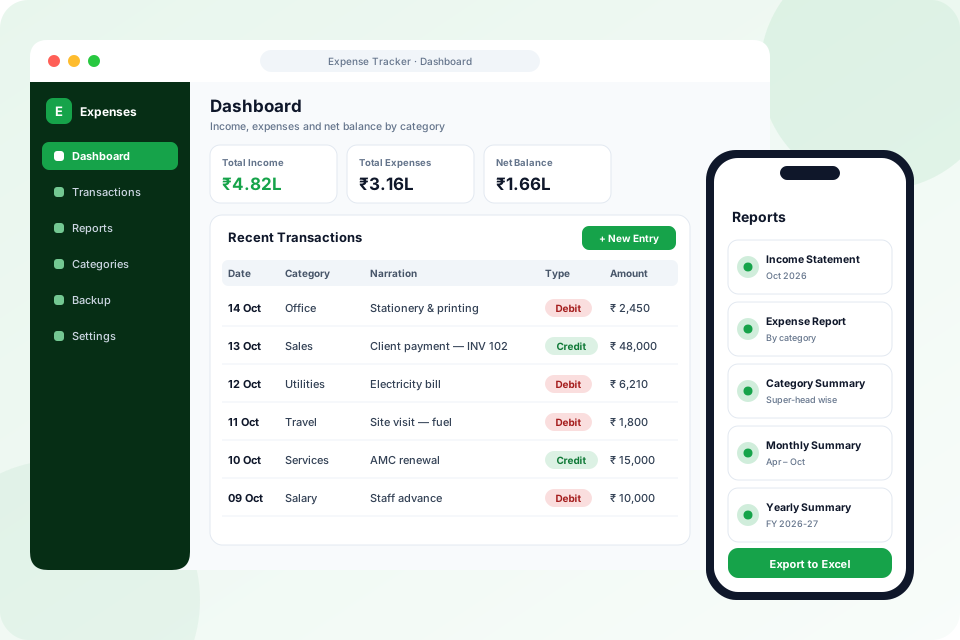
Record · Report · Export
What we deliver
Expense Tracker by Karan Infosys is a focused tool for logging miscellaneous income and expenses. Entries are organised by category (Super Head and Head) as debit or credit with optional narration, and the app produces date-ordered reports, exports to Excel, and supports safe backup and restore. It comes in two editions: a fast, offline Windows desktop app (SQLite) and a web app for access from any browser.
Related solutions
Know Exactly Where the Money Goes
Simple to use, serious about accuracy — and your data stays yours.
Category Hierarchy
Organise entries under a Super Head → Head structure so every debit and credit lands in the right bucket.
Debit / Credit + Narration
Log money in and out with optional narration for context — fast entry that still captures the detail you need later.
Date-Ordered Reports
Reports sort by real calendar dates (newest or oldest first) and show the full transaction list — not a truncated preview.
Excel & JSON Export
Export reports to Excel for sharing, and use JSON import/export to move data between machines.
Backup & Restore
Reliable backup and restore, plus a configurable data folder, keep your records safe and portable.
Desktop & Web Editions
A fast, offline Windows desktop app plus a browser-based web app — pick the edition that fits how you work.
Offline-First on the Desktop
The Windows edition stores everything locally in SQLite, so it works with no internet and your financial records never leave your computer unless you choose to export them.
Talk to Us About Expense Tracker
2
Editions — Windows desktop & web
100%
Offline-Capable — desktop needs no internet
Ships with a clean Windows installer and reliable desktop shortcuts.
Everything Included in Expense Tracker
Recording
- Debit and credit entries with date, amount and optional narration
- Super Head → Head category hierarchy
- Quick Entry for logging in seconds
- Keyboard shortcuts for new transactions, quick entry and navigation
- Dashboard KPIs: total income, total expenses and net balance
- Recent transactions and one-click quick actions
Reports
- Income Statement and Expense Report
- Category, Monthly and Yearly summaries
- Any custom date range
- Date-ordered results, newest or oldest first
- Full transaction list — never a truncated preview
- One-click export to Excel
Data & Editions
- Offline Windows desktop edition (SQLite)
- Browser-based web edition
- Backup and restore, also available from the login screen
- JSON import/export to move data between machines
- Configurable data folder
- Light and dark mode
Technology Behind Expense Tracker
 Flutter
 React
React Python
 FastAPI
Common Questions
Is there a desktop version and a web version?
Yes — there's a fast, offline Windows desktop edition and a browser-based web edition. You can choose the one that matches how your team works.
Can I export my data for accounting?
Yes — export any report to Excel, and use JSON import/export to move data between machines or hand it to your accountant.
Is my data safe if my PC fails?
The desktop edition includes reliable backup and restore and a configurable data folder, so you can keep copies of your records wherever you like.
What reports can I generate?
Income Statement, Expense Report, Category Summary, Monthly Summary and Yearly Summary — for any date range, sorted newest or oldest first, and exportable to Excel.
How are categories organised?
Two levels: a Super Head (for example, Office Expenses) and the Heads under it (for example, Stationery or Electricity), so totals roll up cleanly in every report.
Is it a replacement for full accounting software like Tally?
No. It is a focused tool for day-to-day miscellaneous income and expenses. When your accountant needs the data, export the reports to Excel.