FieldSync
Manage service calls end to end — assign jobs to technicians, track every status change in real time, and keep working even when the network drops. Android, iOS, and web from one app.
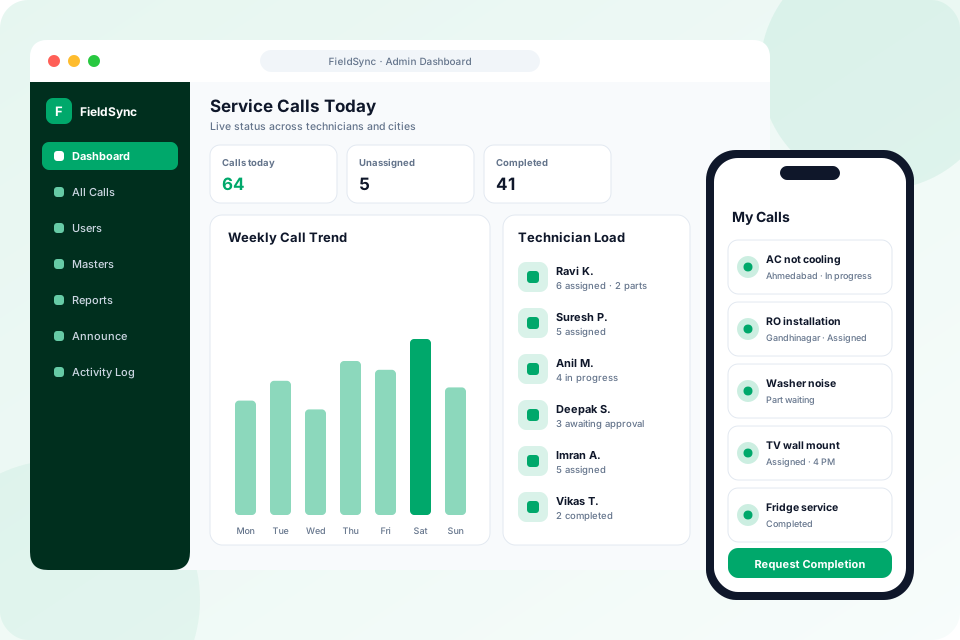
Assign · Track · Close
What we deliver
FieldSync is a cross-platform field-service and call-management app from Karan Infosys. Admins get a dashboard with KPIs, call CRUD, bulk import, user and master-data management, custom fields, Excel reports, and announcements; technicians get their assigned calls, a status workflow, and offline caching. Real-time Firestore streams keep calls, users, and announcements in sync across Android, iOS, and web.
Related solutions
From the Office to the Field — In Sync
Dispatchers see everything. Technicians get exactly what they need.
Admin Dashboard & KPIs
A control room with live KPIs and charts — open calls, resolution times, and workload at a glance.
Technician Workflow
Technicians see only their assigned calls and move them through a clear status workflow — part-waiting, cancelled, resolved, and history.
Offline-First
A local cache keeps assigned calls and pending updates available with no signal — changes sync automatically when connectivity returns.
Real-Time Streams
Calls, users, and announcements stream live, so the whole team always sees the current state without hitting refresh.
Master Data & Custom Fields
Manage call types, cities, and models, bulk-import records, and add custom fields to fit your exact process.
Reports & Activity Logs
Export Excel reports, broadcast announcements, and review activity logs for full accountability across the team.
Built for Technicians on the Move
Technicians sign in with just their mobile number and password — no email gymnastics. The result is faster adoption and fewer support tickets on day one.
Equip Your Field Team
2
Roles — Admin control, Technician focus
100%
Offline-Capable — update calls with zero signal
Multi-tenant ready — one deployment per company, isolated by company ID.
Everything Included in FieldSync
Admin Dashboard & Calls
- KPI cards: calls today, unassigned, in progress, part waiting, completed and cancelled
- Charts for call status, weekly trend, technician workload and city distribution
- Pending completion-request banner with tap-through to the calls
- All Calls search with filters by status, call type and city
- Create and edit calls with customer, product, issue, assignment and custom fields
- Call timeline with reassignment log and approve/deny completion
- Bulk call import from CSV or Excel
Team, Masters & Reports
- Technician and admin user management
- Per-user profile with KPIs and recent calls
- Suspend, reactivate or delete users (blocked while calls are active)
- Masters for call types, cities and product models
- Per-company custom field schemas, optionally technician-editable
- Excel reports by date range: raw calls, technician, status and city summaries
- Broadcast announcements and an admin activity audit log
Technician App
- Simple mobile-number login
- Real-time list of assigned calls
- Start journey to move a call to In Progress
- Request completion — the admin approves or denies
- Part-waiting, cancelled and completed call history
- Offline cached calls with automatic sync on reconnect
- Android, iOS and web from one codebase
Technology Behind FieldSync
 Flutter
 Firebase
 Android
 iOS
iOSCommon Questions
Does it work without internet in the field?
Yes — FieldSync is offline-first. Technicians can view assigned calls and record updates with no signal; everything syncs automatically once they're back online.
How do technicians log in?
With their mobile number and a password — simple and fast, which drives quick adoption among field staff.
Can we tailor call types and fields to our business?
Yes — admins manage master data (call types, cities, models) and custom fields, and we can configure the workflow and reports to match your operation.
How does job completion approval work?
A technician taps Request Completion, which moves the call to Awaiting Approval. The admin sees a pending-requests banner on the dashboard and approves or denies it from the call detail, so nothing is closed without a check.
Can we import our existing service calls?
Yes. Calls can be bulk-imported from CSV or Excel, and you can set up masters for call types, cities and product models before you go live.
What reports does FieldSync produce?
An Excel workbook for any date range, with sheets for raw calls, technician summary, status summary and city summary. It is filtered by the date each call was created.