Digital Restaurant Menu
Staff edit the menu in a web admin. Guests read it on a tablet, a public web page, or a downloadable PDF — and the last good menu stays on the tablet when the network drops.
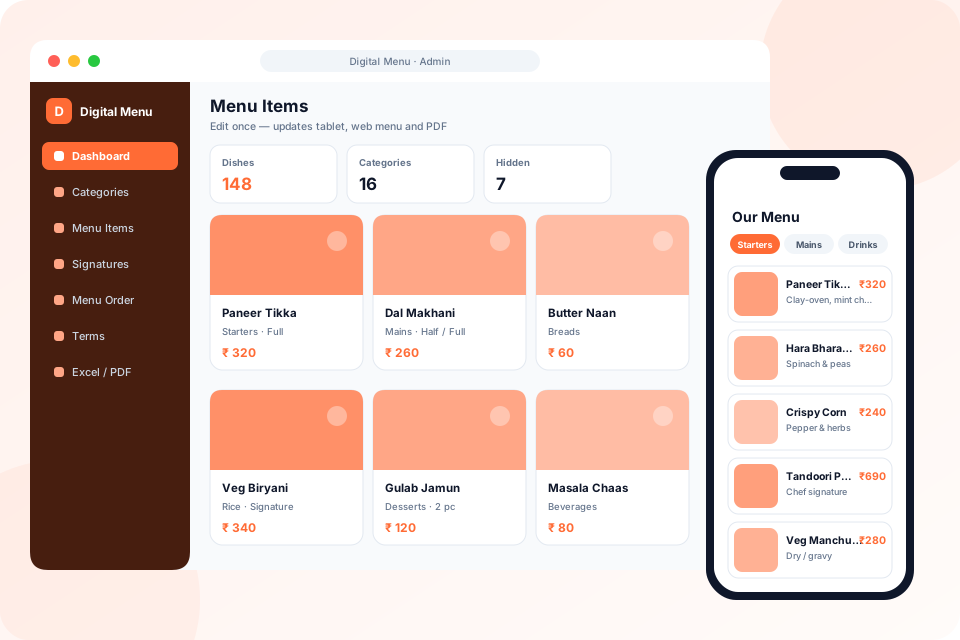
Edit · Publish · Display
What we deliver
Karan Infosys' Digital Restaurant Menu lets restaurants and hotels publish one menu in three places: a public web page, an Android tablet app, and a downloadable PDF. Staff manage nested categories, dishes, photos, prices, and signature items in a web admin, and can download the menu as Excel, edit it, and upload it back for a bulk update. The tablet loads the hosted API first, falls back to a server on the local network, and keeps the last successful menu on the device when the network is gone.
Related solutions
A Menu You Control in Real Time
Change a price at lunch, and every table sees it before dinner.
Public Web Menu
Guests open the live menu in a browser. Inactive dishes stay hidden, and a PDF of the active menu is one download away.
Self-Managed Admin Panel
Your team manages categories, dishes, descriptions, photos, and prices from a simple back-office — changes go live instantly.
Excel Bulk Update
Download the whole menu as Excel, edit prices and dishes, and upload the same file. Nested categories can be reordered by drag and drop.
Rich Dish Pages
High-resolution photos, descriptions, and categories help guests decide faster and order the dishes you want to promote.
Tablet App, Offline
The Flutter tablet app refreshes while online. If the hosted API is down it looks for a local server, and the last successful menu stays on the device.
API-First Backend
A Laravel API powers both the public menu and the mobile app, so the system is ready to extend into online ordering and payments.
No More Reprinting Menus
Every price change, new dish, or sold-out item used to mean a trip to the printer. With a digital menu, your menu is always current, always clean, and always yours to edit.
Digitise Your Menu
0
Printing Costs — update the menu for free, instantly
1
QR Code Per Table — contactless, hygienic, modern
Built and deployed for Legrand Residency Hotel's Spice Zone Restaurant.
Everything Included in Digital Restaurant Menu System
Menu Administration
- Nested categories with measurement units and sidebar visibility
- Dishes with price, notes, portion, serving details and photo
- Active/inactive status per dish
- Signature experiences — priced packages with highlights
- Drag-and-drop ordering of categories and dishes
- Terms & conditions shown on the menu and PDF
- Dashboard with counts and shortcuts
Guest Experience
- Android tablet menu app for tables and counters
- Public web menu that opens from any phone or QR code
- Downloadable, print-ready PDF menu
- Clean category sidebar for fast browsing
- Hidden items stay out of every guest view automatically
Bulk Updates & Reliability
- Download the whole menu as Excel, edit it, and upload it back
- Blank ID adds a dish; an existing ID updates it
- One edit updates tablet, web menu and PDF together
- Tablet falls back to a local-network server if the hosted API is down
- Last good menu stays cached on the tablet when offline
Technology Behind the Menu
 Laravel
 PHP
PHP Flutter
 MySQL
MySQLCommon Questions
Do guests need to install an app?
No — guests can read the public web menu or a PDF. The tablet app is for the restaurant's own devices at the table, and it keeps working from the last saved menu if the network drops.
How hard is it to update the menu?
Anyone on your team can log into the admin panel, edit a dish or price, and the change appears on the public menu immediately — no developer needed.
Can it be customised for our brand and multiple outlets?
Yes — we tailor the branding, layout, and categories to your restaurant or hotel, and the API-first backend supports extending it to multiple outlets and online ordering.
Can we update prices in bulk?
Yes. Download the whole menu as Excel, change prices or dishes, and upload the same file. Rows with an existing ID are updated, and rows with a blank ID are added.
What if the internet goes down?
The tablet first tries the hosted menu, then a server on the local network. If both are unavailable, it shows the last menu it loaded successfully.
Can guests take the menu with them?
Yes. A print-ready PDF of the active menu can be downloaded at any time, and it always matches what is on the tablets and the web menu.